
Tools
Design simulated titrations, subtract buffer controls, and merge standard or back-mixed tandem experiments.
Last verified:
Use Experiment Designer... to explore a simulated experiment before collecting data, Buffer Subtraction... to account for heat seen in a reference experiment, and Experiment Merger... to join consecutive parts of a titration. The sections below explain what each tool takes as input and what it changes in your project.
Open these tools from Tools. Designer simulations stay in their window; Buffer Subtraction stores corrections on targets; Experiment Merger creates a new processed Experiment Data item. See Workspace for selecting project items.
Experiment Designer
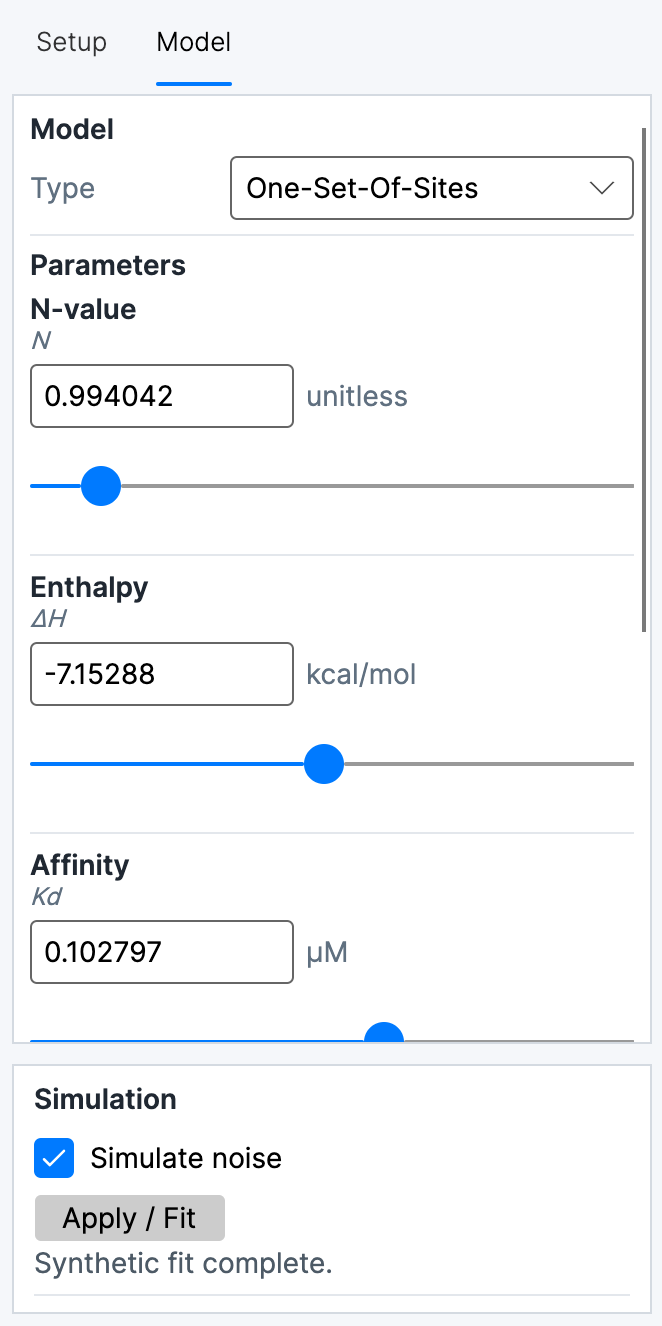
Experiment Designer... creates a synthetic titration from instrument, concentration, injection, and model parameters. The graph updates as the design changes. The designer does not add the synthetic experiment or its fit as a project item.
Setup and model controls
The Setup tab contains Instrument, Cell uM, Syringe uM, injection Count, and Volume uL. Count and volume define the injection schedule. Automatic injection volume derives the injection volume from the selected instrument’s standard syringe volume and injection count. Small first injection gives the first injection of each load a smaller volume and marks it excluded. The Simulation section contains noise controls. Tandem simulation creates consecutive loads, with Segments setting the number of loads. The designer uses its tandem back-mixing model between loads.
The TA presets distinguish Nano ITC and Affinity ITC, each with low- and standard-volume cells. Their cell volumes are representative effective volumes, rather than individual instrument calibrations. Nano ITC low volume uses a 50 µL syringe; the other TA presets use 250 µL.
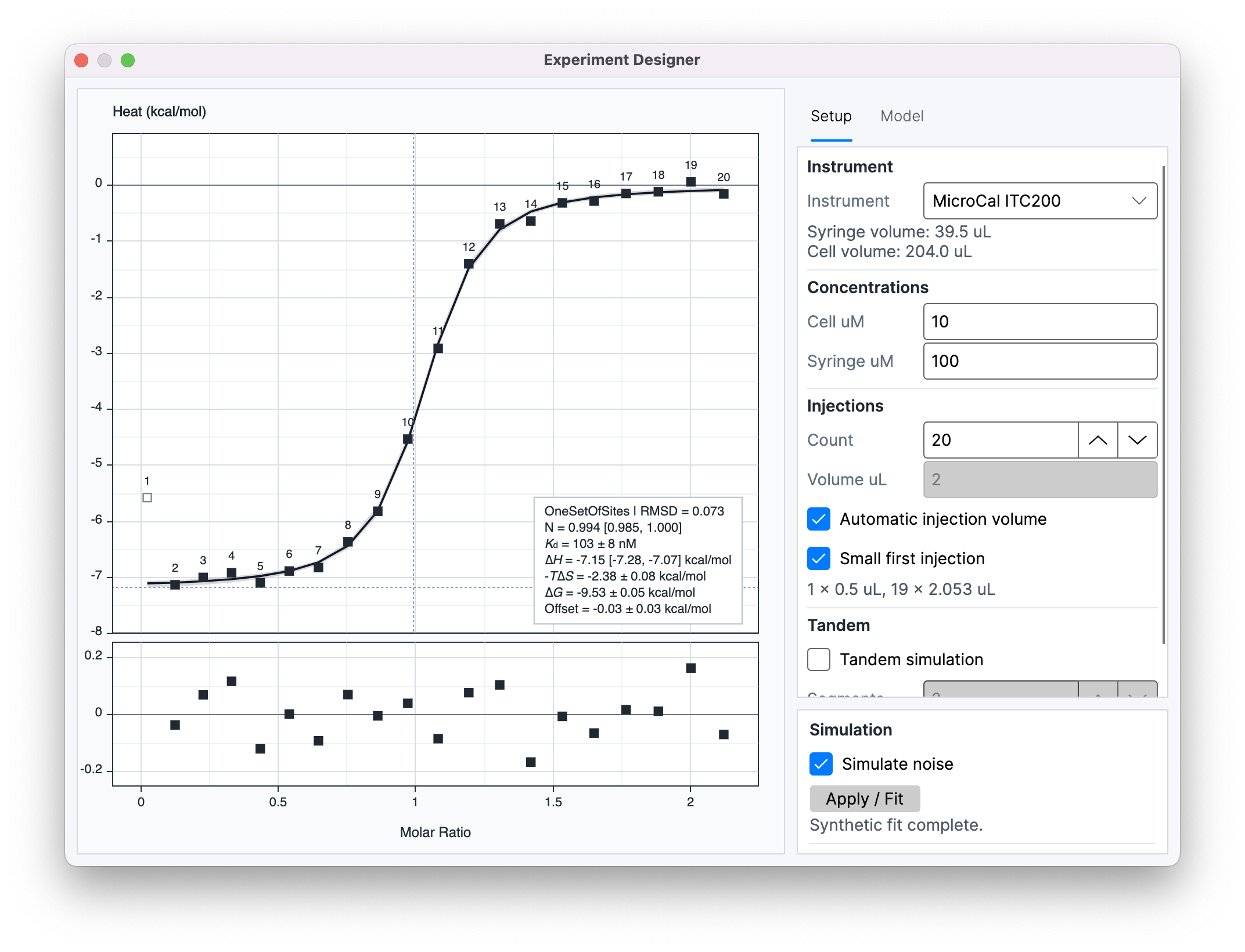
The Model tab contains Type, exposed model Parameters, and model-specific Options. Parameter sliders use practical editing ranges; enter a value in the text field to set a value beyond a slider's range.
For Competitive Binding, enter the total competitor concentration and its dissociation constant (Kd) in the displayed concentration unit. Enter competitor binding enthalpy in the displayed energy unit per mole. For example, = 1 µM and enthalpy = −40 kJ/mol are entered as 1 and −40 when those units are shown.
Buffer Subtraction
Buffer Subtraction... models background heat from one reference experiment and applies the resulting correction to one or more target experiments. The reference selector shows experiment metadata and a Processed or Not yet processed status. The target list excludes the selected reference and tandem experiments, and supports multiple targets. Buffer subtraction is currently unavailable for tandem experiments, including through Experiment Details. The correction uses the reference's available integrated heats; if the reference is processed later, target corrections update. Processing is described in Processing.
The Method selector contains Matched, Linear, and Exp. decay:
- Matched evaluates the reference heat at each target injection number, using nearby included reference injections when the matching injection is unavailable.
- Linear fits a line through valid, included reference injections and evaluates it across target injections.
- Exp. decay fits an exponential-decay model through valid, included reference injections when enough points are available.
The preview graph shows reference and target heats and the selected subtraction model. Reference-point inclusion changes the points available to the fitted methods. Focus Y axis on buffer data changes only the preview range. A continuous model line appears for Linear and Exp. decay; Matched is represented by injection-level reference values.
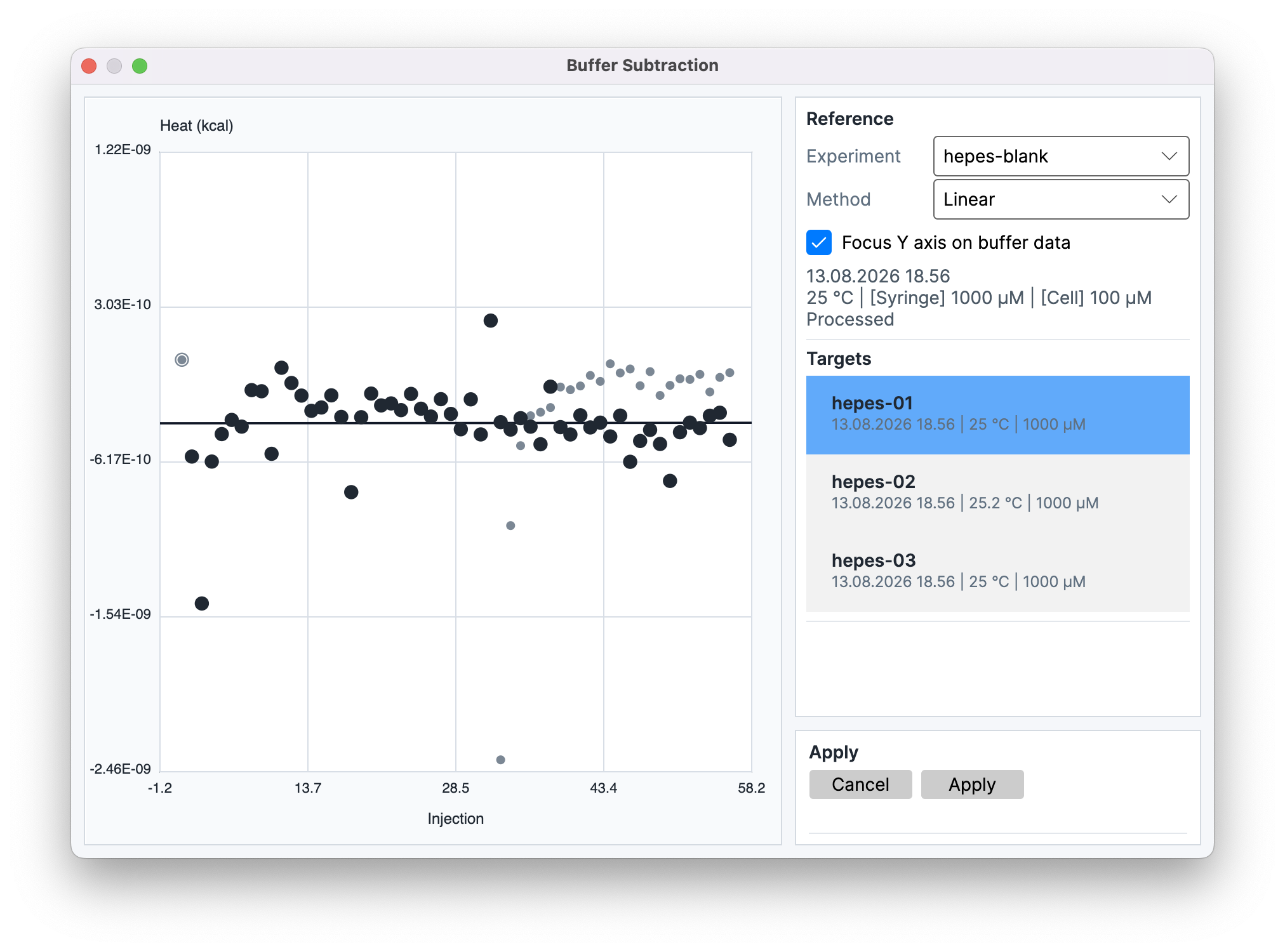
Apply stores the reference and method on each target. The corrected heats are then used for subsequent fitting and export while the original integrated heats remain unchanged. The reference Experiment Data becomes inactive. Changes in its processing or injection inclusion update the target corrections. The subtraction is project data and can affect the validity of dependent results.
When a target is saved without its reference experiment, for example with Save Selected..., the reference's included integrated heats are stored with the target. The target's attribute then shows Missing reference (stored values retained). The correction stays in effect when the target is reintegrated, but the stored reference heats cannot be reprocessed. Opening the reference experiment again, or applying another reference, replaces the stored values.
Corrected heat and uncertainty
Experiment Merger
Source experiments must have no buffer subtraction. Remove any buffer-subtraction attribute in Experiment Details before merging or scanning. This restriction applies to every merger mode.
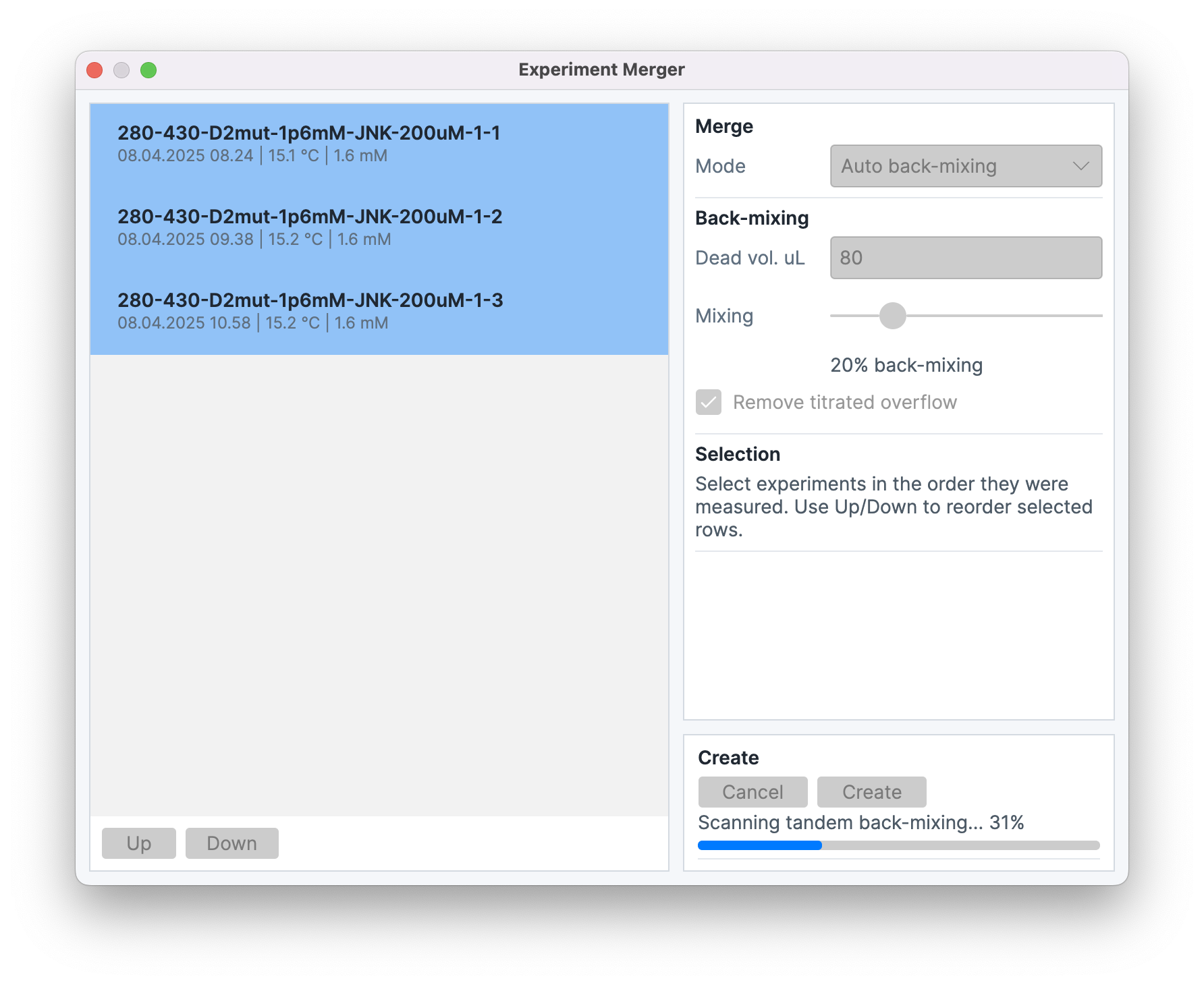
Experiment Merger... joins two or more eligible thermogram experiments from consecutive segments of a tandem titration. The source list contains thermograms that are not already tandem experiments. Selection order defines segment order; Up and Down reorder selected rows.
The merge Mode selector contains:
- Simple tandem, which concatenates the segments using the standard concentration progression without a user-selected back-mixing correction.
- Fixed back-mixing, which applies one configured mixing fraction at every segment transition. With three or four selected experiments, you can instead set an individual fraction for each reload.
- Auto back-mixing, which estimates the reload mixing fractions from the selected experiments and is available for up to five source experiments.
Back-mixing controls include Dead vol. uL, the Mixing fraction, and Remove titrated overflow. Dead volume represents the filling-stem or overflow volume above the active cell volume. The overflow control records whether titrated overflow was removed between segments. In Fixed mode, the shared slider supplies the fraction. With three or four experiments selected, enable the individual-fractions option to set Reload 1, Reload 2, and, for four experiments, Reload 3 separately. Auto mode estimates the values from the selected data; these are inferred corrections rather than direct measurements of mixing.
Choose One-site when a one-set-of-sites model is appropriate, or Model-free to match the two sides of each reload without a binding model. Model-free needs at least three included injections among the six nearest on each side. Compare criteria for noisy data or reloads near saturation.
Create produces a new processed Experiment Data item. Its thermogram samples are time-shifted and concatenated, its injection sequence retains segment boundaries, and its segment metadata stores the calculated starting active-cell and active-titrant concentrations. The merged item’s comments retain the first source’s notes and append the selected tandem mode, the auto criterion when used, the back-mixing settings, and the selected fractions in reload order. Source experiments remain separate and are not changed by creation; the new item is marked as a tandem experiment and is not eligible as a later merger source. It is a snapshot and does not update if its source experiments are subsequently edited. The resulting item can be fitted through Analyze Data.
When the first source experiment has an external experiment ID, the merged experiment's ID is that value followed by -concat; if its ID is blank, the merged ID stays blank. The cell and syringe sample/batch IDs are copied only when every source has the same nonblank value; otherwise the merged IDs are blank. The merger does not open the import review, so select the merged experiment and open Details > Identifiers to add or change IDs.
The new experiment uses the Injection bookkeeping method selected in Preferences > Processing for dilution during each injection. That choice is separate from the merger’s between-segment back-mixing setting. See Injection bookkeeping for the methods and their limits.
What happens at a reload
In Fixed back-mixing and Auto back-mixing, the model tracks the active cell and the dead/overflow volume separately. It starts with the same macromolecule concentration in both and no syringe ligand in either. During a segment, injections change the active-cell concentrations and displaced material enters the dead volume. At the transition to the next segment, the model first removes overflow if Remove titrated overflow is selected, then mixes the chosen fraction of the remaining dead volume with the active cell. The resulting active-cell concentrations become the starting concentrations for the next segment. This changes the calculated concentrations used for fitting; it does not add a heat peak or alter the measured thermogram.
Automatic back-mixing calculation
One-site minimizes the combined titration's one-set-of-sites RMSD. Model-free solves reloads in order, keeping earlier fractions. Each candidate recalculates concentrations and fits one unweighted, monotonic cubic to heat per mole of injectant against midpoint molar ratio, using included injections among the six nearest positions on each side. Excluded injections still contribute their delivered volume to bookkeeping.
The cubic must keep rising or falling across the window, so it assumes the local isotherm does not turn. Where fractions are poorly distinguished, a weak, chosen preference favors 5%; this is not measured mixing information. The small local window makes model-free estimates less precise with noise or near saturation.